- Difficulty
- Intermediate
- Build time
- 90-140 min
- Estimated cost
- $0
- Age range
- 11-18
- Workspace
- A computer or tablet workspace
The finish line
What you will build
The browser project loads a fixed maze, executes a queued command sequence, rejects wall collisions, and reaches the goal from the start.
Learning goals
- Identify how queued forward, left, and right commands produces validated robot position and heading.
- Construct and explain a discrete command sequence-to-grid navigation system.
- Measure how command sequence changes performance.
- Diagnose losses caused by off-by-one errors and coordinate confusion.
Before you build
Materials, tools, and safety
Reuse-material cost: $0-$3 with reused materials. Supervision: Adult help recommended for sharp or heated tools.
Tools
- Computer or tablet
- Web browser or offline editor
- Notebook for test results
Low-cost swaps
- Use the platform's offline editor when internet access is limited.
- Storyboard the logic with cards and arrows before opening the coding tool.
- Act out the algorithm on a floor grid before using a screen.
Project-specific safety
- Use a teacher, parent, or guardian account where the platform requires an adult.
- Do not publish student names, locations, or personal contact details inside a project.
- Keep projects local or use approved accounts, and do not publish names, school locations, or personal information.
Orient the build
Treat the screen origin and stage edges as fixed references. The control that creates queued forward, left, and right commands is the input side; the sprite, score, or display that produces validated robot position and heading is the output side.
Build it
Step-by-step instructions
Step 1
Define the grid
Represent open cells with 0 and walls with 1.
Mark start and goal coordinates.
Step 2
Store robot state
Create row, column, and heading values.
Draw an arrow for each heading.
Step 3
Build turn logic
Rotate heading left or right without changing position.
Test four consecutive turns.
Builder checkpoint: After build turn logic, the first subassembly should stay aligned when handled gently.
Step 4
Propose forward motion
Convert heading into row and column offsets.
Do not change state yet.
Watch for: If this stage binds or drifts, inspect missing collision checks before adding more parts.
Step 5
Check collisions
Reject proposed cells outside the grid or equal to 1.
Show a visible status message.
Step 6
Draw the maze
Render every cell, wall, goal, and robot from current state.
Repeat essential status in text.
Builder checkpoint: After draw the maze, operate the build slowly and confirm that validated robot position and heading begins without binding.
Step 7
Queue commands
Let buttons append F, L, or R and run one item at a time.
Provide clear and step controls.
Step 8
Verify a solution
Plan on paper, enter the sequence, and step through it.
Record and fix the first mismatch.
Builder checkpoint: At the final checkpoint, The browser project loads a fixed maze, executes a queued command sequence, rejects wall collisions, and reaches the goal from the start.
See the engineering
Why it works
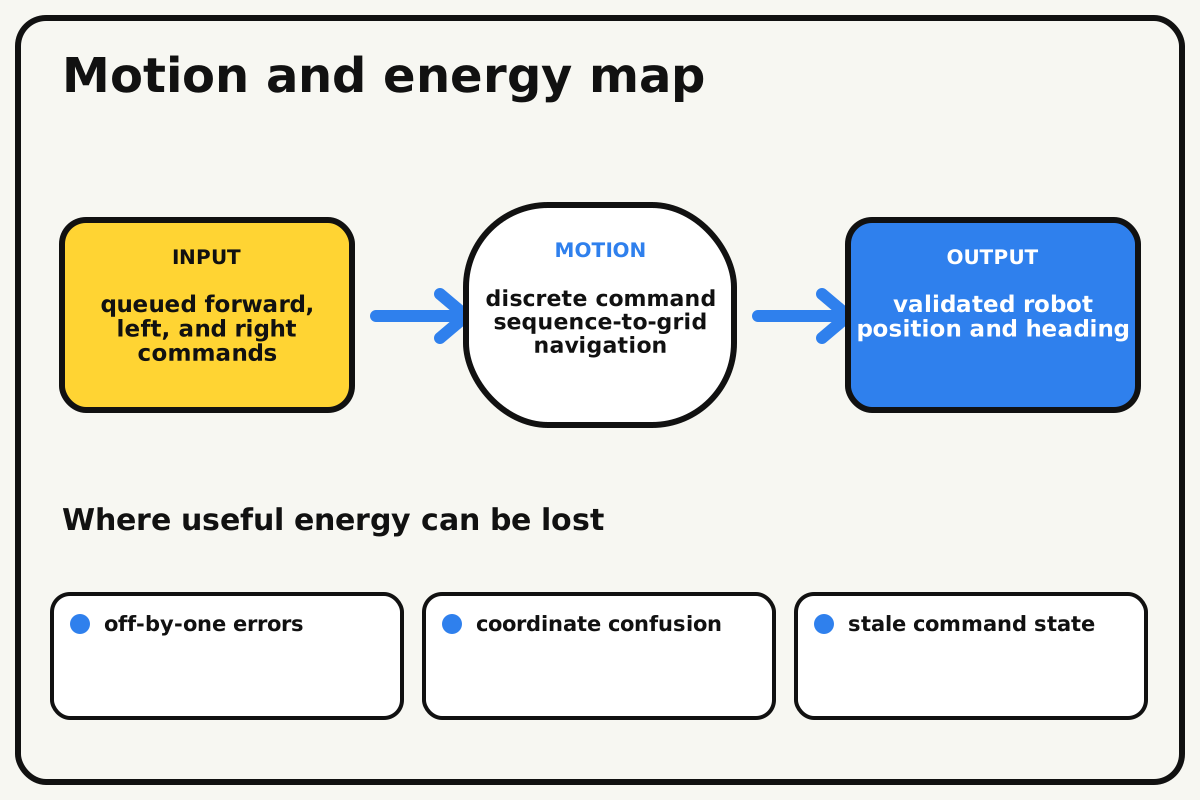
- Input
- queued forward, left, and right commands
- Output
- validated robot position and heading
- Motion
- discrete command sequence-to-grid navigation
- Energy losses
- off-by-one errors, coordinate confusion, stale command state, missing collision checks
Why this works
State-based navigation
The robot's state contains row, column, and heading. A command proposes a new state, and collision logic accepts it only when the destination is inside the grid and not a wall.
Look for: Step through one command at a time and write the expected row, column, and heading before running it.
Where the energy goes
Efficiency and losses
The ideal model leaves out off-by-one errors, coordinate confusion, stale command state, missing collision checks. These effects turn some input energy into heat, sound, vibration, or unwanted motion, so measured performance will be lower than an ideal calculation.
Look for: Run the build slowly and locate the first place where off-by-one errors becomes visible or audible.
Math bite
Convert heading to a turn
Formula: new heading index = (old index + turn + 4) mod 4
- Old heading east = 1
- Left turn = -1
Substitute: new = (1 - 1 + 4) mod 4 = 0
Result: Heading index 0 represents north.
Modular arithmetic wraps after the fourth direction.
The chosen index order must stay consistent.virtual-robot-maze.html
A complete self-contained grid maze with queued keyboard-friendly commands and collision-safe state updates.
<!doctype html><html lang="en"><meta charset="utf-8"><meta name="viewport" content="width=device-width"><title>Virtual Robot Maze</title><style>body{font:18px system-ui;max-width:700px;margin:2rem auto}.grid{display:grid;grid-template-columns:repeat(6,52px);gap:2px}.cell{width:52px;height:52px;display:grid;place-items:center;border:1px solid #555}.wall{background:#111}.goal{background:#ffd433}.robot{color:#075fd8;font-size:30px}button{font:inherit;padding:.6rem;margin:.25rem}</style><h1>Virtual Robot Maze</h1><div id="grid" class="grid" aria-label="Six by six maze"></div><p id="status" aria-live="polite"></p><button data-cmd="L">Turn left</button><button data-cmd="F">Forward</button><button data-cmd="R">Turn right</button><button id="run">Run queue</button><button id="clear">Clear</button><p>Queue: <output id="queue"></output></p><script>
const maze=[[0,0,1,0,0,0],[1,0,1,0,1,0],[0,0,0,0,1,0],[0,1,1,0,0,0],[0,0,0,1,1,0],[1,1,0,0,0,0]], dirs=[[-1,0],[0,1],[1,0],[0,-1]], arrows=['↑','→','↓','←'];let robot={r:0,c:0,d:1},queue=[];const goal={r:5,c:5};
function draw(){const grid=document.getElementById('grid');grid.innerHTML='';maze.forEach((row,r)=>row.forEach((wall,c)=>{const cell=document.createElement('div');cell.className='cell'+(wall?' wall':'')+(r==goal.r&&c==goal.c?' goal':'');if(r==robot.r&&c==robot.c){cell.textContent=arrows[robot.d];cell.classList.add('robot')}grid.append(cell)}));document.getElementById('queue').textContent=queue.join(' ')}
function step(cmd){if(cmd==='L')robot.d=(robot.d+3)%4;else if(cmd==='R')robot.d=(robot.d+1)%4;else{const nr=robot.r+dirs[robot.d][0],nc=robot.c+dirs[robot.d][1];if(nr<0||nc<0||nr>=maze.length||nc>=maze[0].length||maze[nr][nc]){document.getElementById('status').textContent='Blocked at row '+nr+', column '+nc;draw();return}robot.r=nr;robot.c=nc}document.getElementById('status').textContent=robot.r===goal.r&&robot.c===goal.c?'Goal reached!':'Robot at row '+robot.r+', column '+robot.c;draw()}
document.querySelectorAll('[data-cmd]').forEach(b=>b.onclick=()=>{queue.push(b.dataset.cmd);draw()});document.getElementById('run').onclick=()=>{const run=[...queue];queue=[];let i=0;const timer=setInterval(()=>{if(i>=run.length){clearInterval(timer);return}step(run[i++])},350)};document.getElementById('clear').onclick=()=>{queue=[];robot={r:0,c:0,d:1};draw()};draw();</script></html>
Make it behave
Test, troubleshoot, and tune
Controlled test
Start here: Run four right turns and confirm the robot returns to its original heading.
Success looks like: The provided command queue reaches the goal and every attempted wall move is rejected.
Measure: Final position, collision count, command count, status text, and keyboard operation.
Change: command sequence
Keep constant: maze, start, goal, movement rules, heading order, and render function
- known solution
- one intentional wall collision
- same solution with step mode
| Symptom | Likely cause | Confirm it | Fix |
|---|---|---|---|
| Robot walks through walls | State updates before validation | Attempt a known wall move | Validate proposed state first |
| Left and right are reversed | Heading order or turn sign is wrong | Run four one-step turns | Use one documented direction array |
| Maze draws flipped | Row and column map to x and y incorrectly | Mark cell (1,2) on paper | Use column for x and row for y |
| Queue repeats old commands | Run index is not reset | Clear and enter a new path | Reset queue and pointer together |
Choose your tradeoff
Make state transitions correct before adding automatic solving. Faster animation is pleasant, but step mode is essential for debugging and accessibility.
Keep experimenting
Try another version
Five-by-five maze
Use buttons with immediate commands.
Shortest path
Compare valid command counts.
Breadth-first search
Generate a shortest route and explain the visited set.
Build together
Classroom and access options
Classroom version
Teams can compare command sequence while keeping maze, start, goal, movement rules, heading order, and render function. Assign builder, tester, recorder, and explainer roles; have each team predict the result before collecting three trials.
Access adaptations
- Use keyboard-accessible controls and high-contrast sprites or interface elements.
- Pair a navigator who reads instructions with a driver who enters blocks or code.
- Provide keyboard-operable buttons, screen-reader status text, high-contrast walls, and command cards with tactile symbols.
Reflect on the design
- How did command sequence change the measured result?
- Where did off-by-one errors affect the build most strongly?
- What evidence shows that state-based navigation explains the motion?
- Which change would improve validated robot position and heading without creating a new problem?
Glossary
- State-based navigation
- The robot's state contains row, column, and heading.
- Input
- The action or energy supplied to a system; here it is queued forward, left, and right commands.
- Output
- The useful response produced by a system; here it is validated robot position and heading.
- Efficiency
- The fraction of input energy that becomes useful output instead of friction, sound, heat, or unwanted motion.
Build your dreams
One build can start the next.
Share what you learned, change one variable, and help another builder understand what worked.
Explore more guidesSources and build notes
A platform-appropriate educational coding project with original logic and instruction.
- Programming project basis: A platform-appropriate educational project with complete logic, setup instructions, debugging, and original examples.
Written and edited by BrickLabClips. Published 2026-07-22; updated 2026-07-22.